- Published on
用 GPGPU 加速你的计算
从渲染管线到 GPGPU
当我们把渲染管线拿来做通用计算,而不是单纯用于绘制像素时,本质上就是在把 GPU 用在“渲染之外”的任务上。在 WebGL 里,如果把 Texture 看作一个多维数组,那么我们就可以在 shader 中读取这些数组、完成计算,再把结果输出出来。上面这几句话其实已经概括了 GPGPU 最基础的工作方式。
这里有几个关键点:
- 把 Texture 看作多维数组
- 在 shader 中读取并计算这些多维数组
- 把计算结果输出出来
把 Texture 当作多维数组来计算和输出
一个 Texture 通常包含四个通道,因此我们可以把它理解成一个大小为 d * d * c 的矩阵。每个通道都可以存不同的数据,所以只要把需要加速的数据写入 Texture,就可以把这部分数据加载到 GPU 上。
const resolution = {
  x: 4,
  y: 4,
}
// Load data, assuming the data is single-channel
gl.texImage2D(
  gl.TEXTURE_2D,
  0,
  gl.LUMINANCE,
  resolution.x,
  resolution.y,
  0,
  gl.LUMINANCE,
  gl.UNSIGNED_BYTE,
  new Uint8Array([1, 2, 3, 4, 5, 6, 7, 8, 9, 10, 11, 12, 13, 14, 15, 16])
)
通过 Shader 读取这个多维数组
输入阶段只要保证 Texture 的尺寸是规则矩形,就可以在 fragment shader 里通过 texture2D 正确读取其中的数据。
我们可以先用顶点去模拟一个 的裁剪空间,再通过两个三角形拼出一个从 -1 到 +1 的四边形:
gl.bufferData(gl.ARRAY_BUFFER, new Float32Array([
  -1, -1,
   1, -1,
  -1,  1,
  -1,  1,
   1, -1,
   1,  1,
]), gl.STATIC_DRAW);
然后,在 fragment shader 里通常有两种办法拿到这份数据:
使用
gl_FragCoord获取像素坐标,再把它转换成 UV 坐标:uniform vec2 u_resolution; // Assuming we passed in the size of the Texture uniform sampler2D textureData; // Texture used to read data void main() { vec2 texCoord = gl_FragCoord.xy / resolution; // Sample data from the texture vec4 data = texture2D(textureData, texCoord); // Perform some computation on the data vec4 result = someComputation(data); // Output the computed result gl_FragColor = result; }在 vertex shader 里传递顶点数据,再利用插值结果得到 UV 坐标:
vec4 a_position;
varying vec2 index;

void main() {
    index = (a_position.xy + 1.0) / 2.0;
    gl_Position = a_position;
}
之后在 fragment shader 中,由于传过来的数据会自动插值,所以
index就可以直接当作 UV 坐标使用:varying vec2 index; // Texture coordinates passed from the vertex shader uniform sampler2D textureData; // Texture used to read data void main() { vec4 data = texture2D(textureData, index); // Perform some computation on the data vec4 result = someComputation(data); // Output the computed result gl_FragColor = result; }
输出计算结果
输出结果可以通过 gl.readPixels 读取。需要注意的是,这个输出会包含完整的 RGBA 四个通道。
示例:Slime Simulation
Slime Simulation 简介
这个模拟基于论文1中对黏菌 Physarum polycephalum 扩散机制的建模。如下图所示:
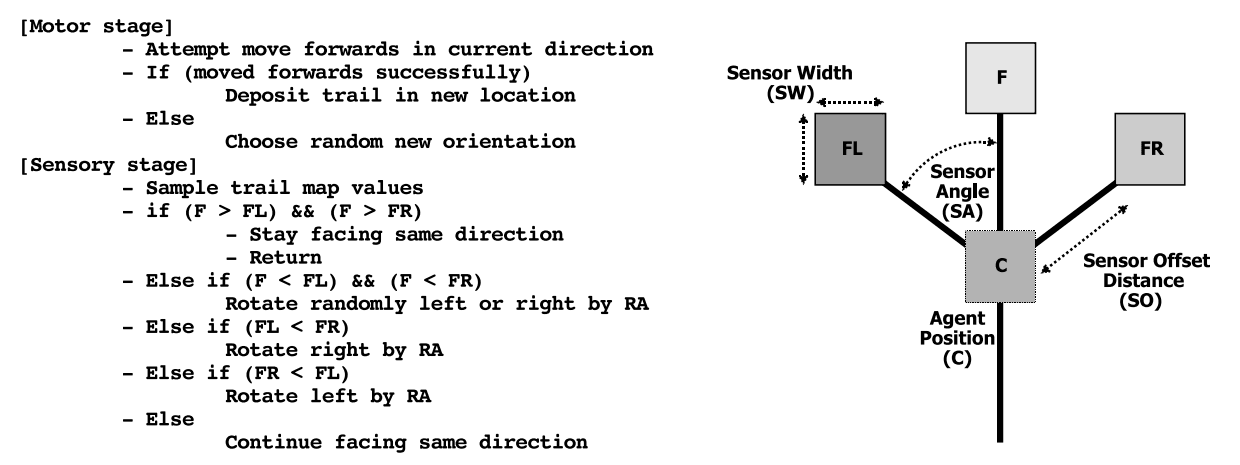
简单来说,黏菌在向前移动时会留下 pheromone,同时在前方部署传感器。图中这三个固定方向的传感器分别记作 F、FL 和 FR。它们会感知之前留下的 pheromone trail,于是黏菌会更倾向于朝浓度更高的方向移动。如果遇到障碍物,它会随机选择一个新方向继续前进。
这里用 WebGL 实现了这种黏菌运动效果,并用 GPGPU 做加速计算,最终效果就是下面这个模拟器。代码思路参考了一个用 Unity 展示该模拟的视频。2
提示:可以通过调节超参数观察不同效果。如果页面卡住了,请点击 Stop 按钮。
实现细节
记录位置与扩散数据
我们使用一个 texture(pos_tex)来记录每个黏菌当前的位置(2D)和朝向角度(1D)。这个 texture 的大小设为 1024x1024,共有四个通道,其中 rg 通道记录位置数据,b 通道记录角度数据。
public convertToTextureData(positions: number[], angles: number[]) {
    const data = new Float32Array(1024 * 1024 * 4);
    for (let i = 0; i < angles.length; ++i) {
        const src = i * 2;
        const dst = i * 4;
        data[dst] = positions[src];
        data[dst + 1] = positions[src + 1];
        data[dst + 2] = angles[i];
    }
    return data;
}
public createAgents(positions: number[], angles: number[]) {
    const texture = twgl.createTexture(this.gl, {
        src: this.convertToTextureData(positions, angles),
        width: 1024,
        height: 1024,
        min: this.gl.NEAREST,
        wrap: this.gl.CLAMP_TO_EDGE,
    });
    const framebufferInfo = twgl.createFramebufferInfo(this.gl, [
        { attachment: texture, }
    ], 1024, 1024);
    return {
        texture,
        framebufferInfo,
    };
}
类似地,我们还用一个同尺寸的 texture(spread_tex)来记录空间中残留的 pheromone,初始时它是一个空 texture。
位置更新与扩散模拟
位置更新遵循前面提到的黏菌运动模型。程序会设置三个方向传感器,从 spread_tex 中采样并比较这些位置的信息,最终决定移动方向。
...
...
float sense(vec2 position,float sensorAngle){
    vec2 sensorDir=vec2(cos(sensorAngle),sin(sensorAngle));
    vec2 sensorCenter=position+sensorDir*sensorOffsetDist;
    vec2 sensorUV=sensorCenter/resolution;
    vec4 s=texture2D(spread_tex,sensorUV,sensorSize);
    return s.r;
}
void main(){
    float vertexId=floor(gl_FragCoord.y*agentsTexResolution.x+gl_FragCoord.x);
    vec2 uv=gl_FragCoord.xy/agentsTexResolution;
    vec4 temp=texture2D(tex_pos,uv);
    vec2 position=temp.rg; // rg --> pos
    float angle=temp.b; // b --> angle
    float width=resolution.x;
    float height=resolution.y;
    float random=hash(vertexId/(agentsTexResolution.x*agentsTexResolution.y)+time);
    // sense environment
    float weightForward=sense(position,angle);
    float weightLeft=sense(position,angle+sensorAngleSpacing);
    float weightRight=sense(position,angle-sensorAngleSpacing);

    float randomSteerStrength=random;

    if(weightForward>weightLeft&&weightForward>weightRight){
        angle+=0.; //F
    }else if(weightForward<weightLeft&&weightForward<weightRight){
        angle+=(randomSteerStrength-.5)*2.*turnSpeed*deltaTime;
    }else if(weightRight>weightLeft){
        angle-=randomSteerStrength*turnSpeed*deltaTime; //FR
    }else if(weightLeft>weightRight){
        angle+=randomSteerStrength*turnSpeed*deltaTime; //FL
    }

    // move agent
    vec2 direction=vec2(cos(angle),sin(angle));
    vec2 newPos=position+direction*moveSpeed*deltaTime;
    // clamp to boundries and pick random angle if hit boundries
    ...
    gl_FragColor=vec4(newPos,angle,0);
}
与此同时,pheromone 的扩散过程在 spread_tex 中模拟。当前像素会采样自己周围 3x3 区域的信息并做平滑,然后再通过超参数控制扩散速率(diffuseSpeed)和蒸发速率(evaporateSpeed)。
void main(){
  vec4 originalValue=texture2D(tex,v_texcoord);
  // Simulate diffuse
  vec4 sum;
  for(int offsetY=-1;offsetY<=1;++offsetY){
    for(int offsetX=-1;offsetX<=1;++offsetX){
      vec2 sampleOff=vec2(offsetX,offsetY)/resolution;
      sum+=texture2D(tex,v_texcoord+sampleOff);
    }
  }
  vec4 blurResult=sum/9.;
  vec4 diffusedValue=mix(originalValue,blurResult,diffuseSpeed*deltaTime);
  vec4 diffusedAndEvaporatedValue=max(vec4(0),diffusedValue-evaporateSpeed*deltaTime);
  gl_FragColor=vec4(diffusedAndEvaporatedValue.rgb,1);
}
渲染
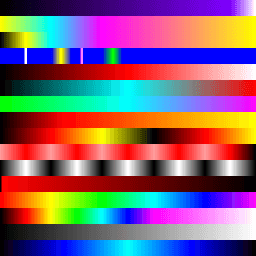
最终的模拟结果会根据 pheromone 强度和黏菌位置来可视化。这里预先生成了 16 套配色方案,并把它们存进一个 texture 中,之后根据位置和强度进行采样,得到最终视觉效果。
Footnotes
Jones, J. (2010). Characteristics of pattern formation and evolution in approximations of physarum transport networks. Artificial Life, 16(2), 127–153. https://doi.org/10.1162/artl.2010.16.2.16202 ↩